Skip to content
RequestPad

Coming soon

For iPhone, iPad and Mac

An unbloated API client for iPhone, iPad and Mac.

RequestPad is a native HTTP and GraphQL client for iPhone, iPad and Mac. Keep collections as plain .bru files in a folder you own — with no account, no cloud and no tracking.

Coming soon to the App Store

Free to download · Requires iOS 17, iPadOS 17 and macOS 14 or later

  • No account
  • No cloud
  • No tracking
Follow one request through the app
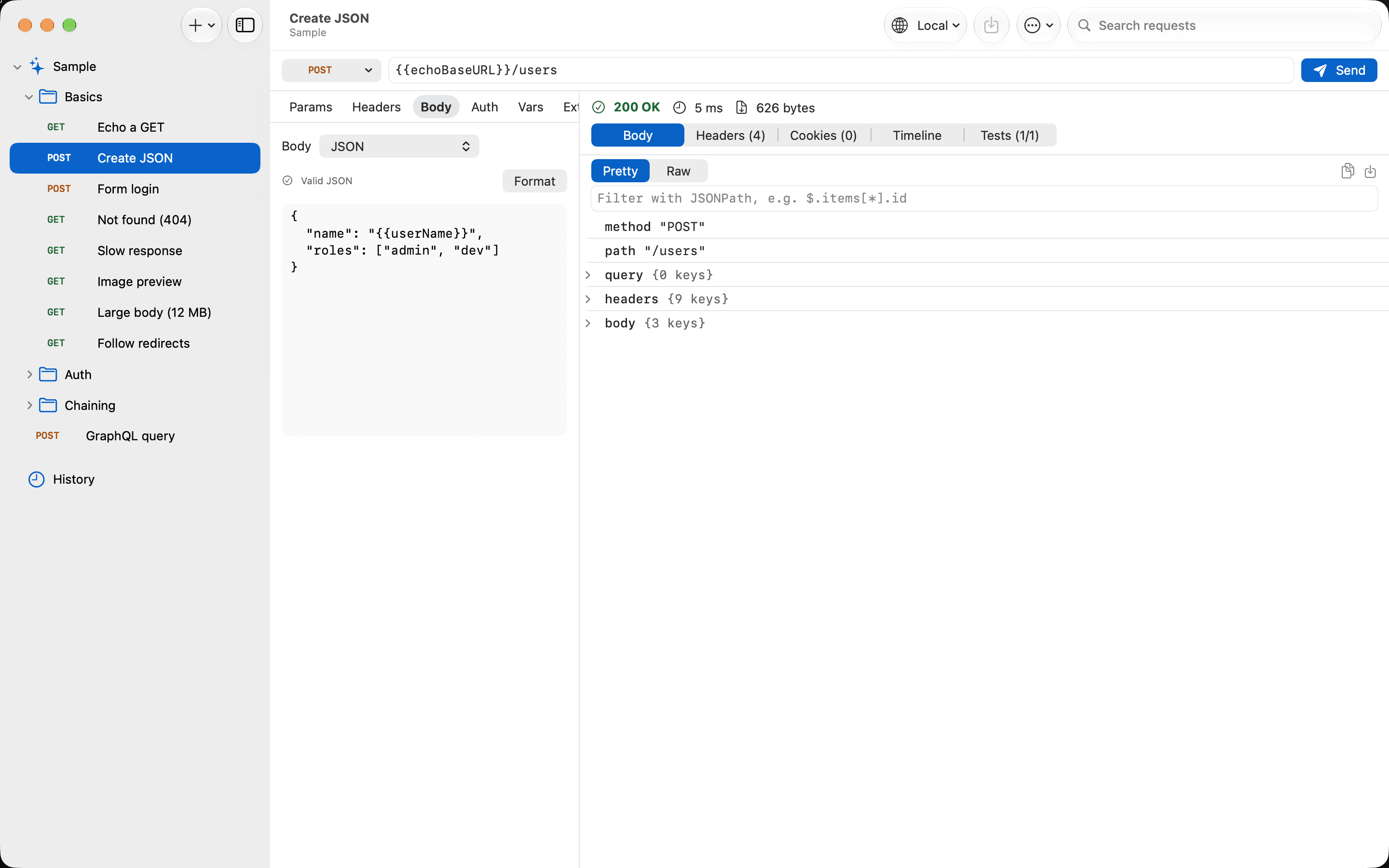
RequestPad on Mac: a POST request to {{echoBaseURL}}/users returning 200 OK with 626 bytes, the JSON response shown as a collapsible tree.
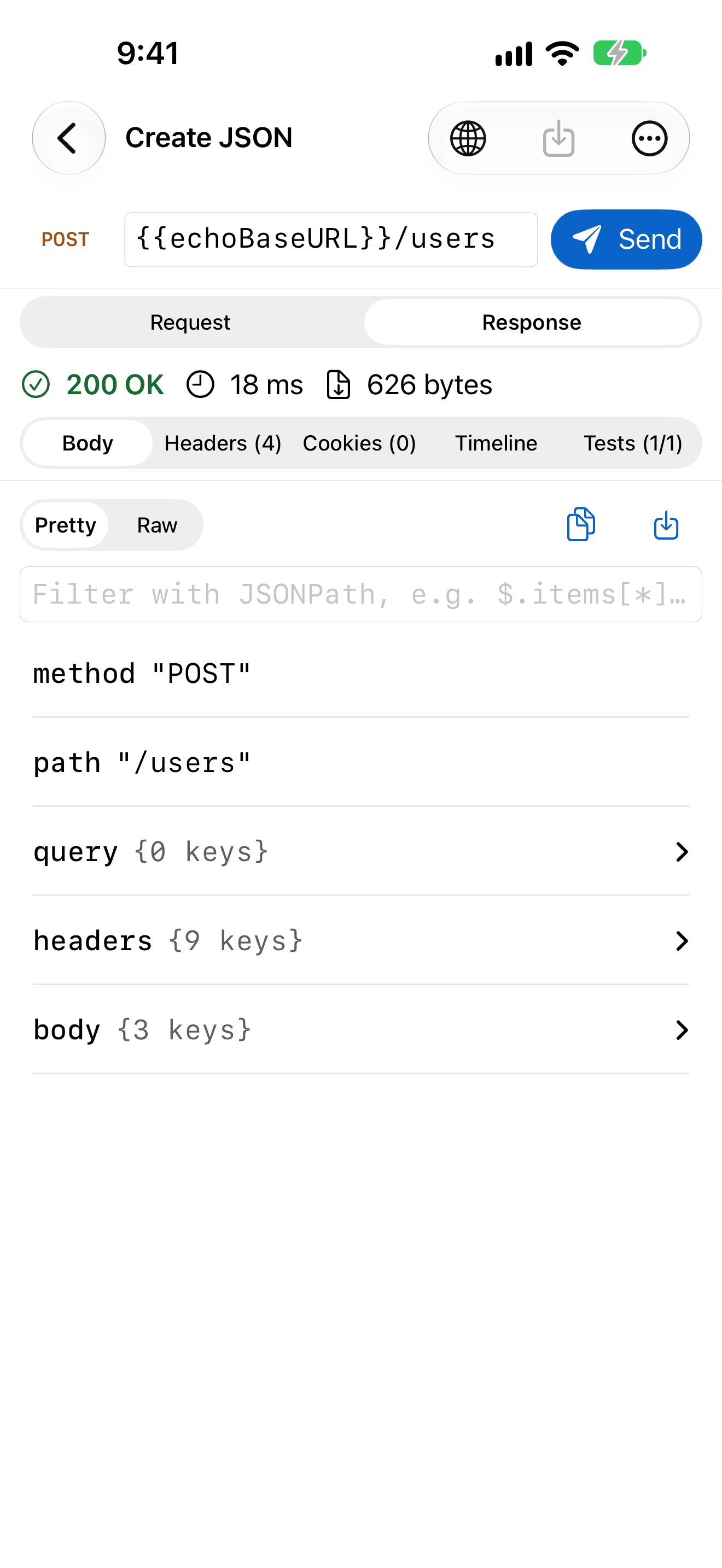
RequestPad on iPhone: a POST request to {{echoBaseURL}}/users returning 200 OK with 626 bytes, the JSON response shown as a collapsible tree.

Follow one request

From an empty URL to a passing collection.

Scroll through the loop RequestPad is built around. Every screen is the real app on iPhone.

01 · Set up

Pick where your requests go.

Keep Local, Staging and Production as environments full of {{variables}}, and switch between them in one tap. Secret values stay in the Keychain, never in your files.

  • Environments and shared globals
  • Secrets stored in the Keychain
  • Unresolved variables flagged before you send
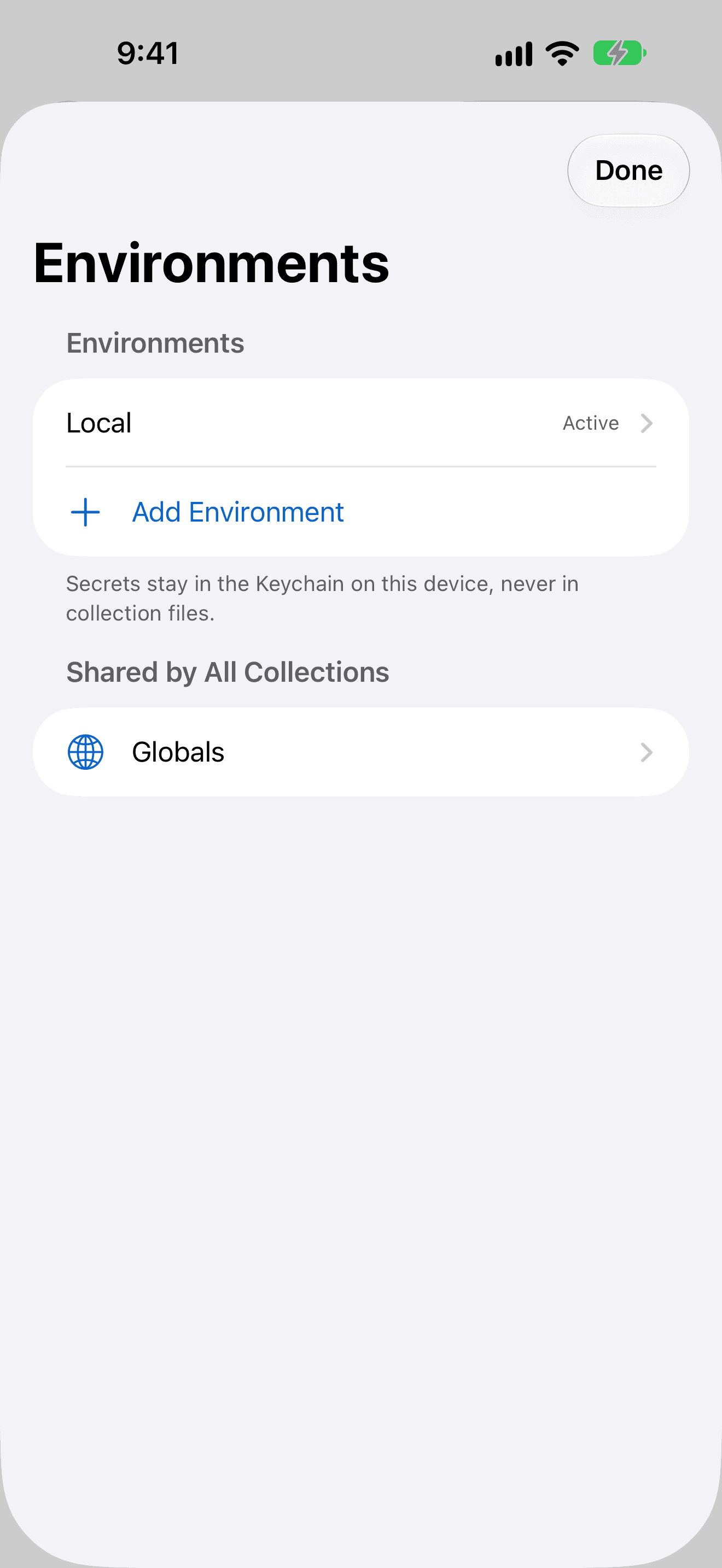
RequestPad on iPhone: the Environments sheet with the Local environment active, shared Globals, and a note that secrets stay in the Keychain.

02 · Send

Tap Send. Read what came back.

Any method, any body, with Bearer, Basic or API key authorization. The response arrives with its status, time and size, and JSON opens as a tree you can filter with JSONPath.

  • DNS, connect, TLS and waiting times
  • Raw text, image previews, save to file
  • OAuth 2.0 client credentials and PKCEPRO
RequestPad on iPhone: a POST request to {{echoBaseURL}}/users returning 200 OK with 626 bytes, the JSON response shown as a collapsible tree.

03 · Chain

Carry a value into the next request.

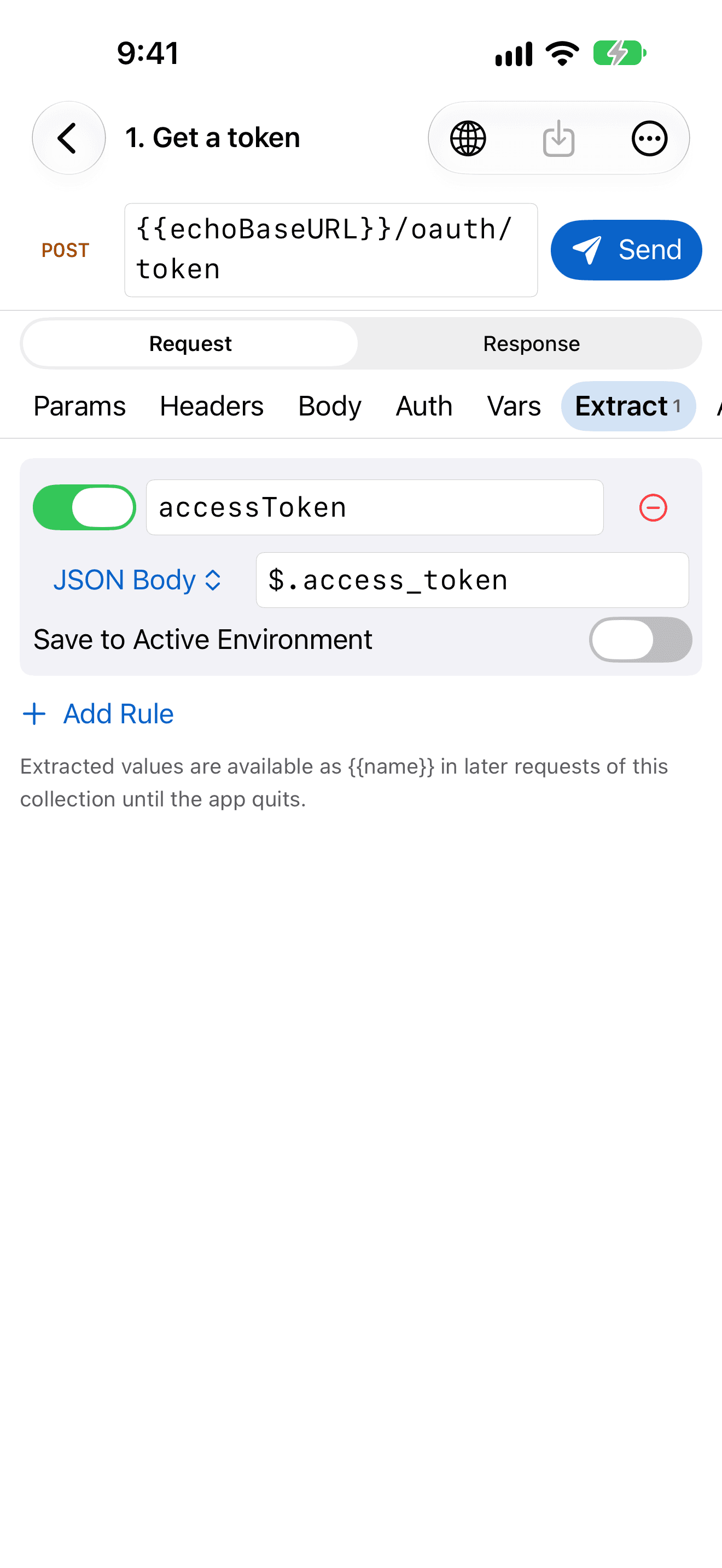
An extraction rule saves $.access_token from the sign-in response into a variable, so the next request is already authorized. No scripts to write.

  • Extraction rules with JSONPathPRO
  • Optionally saved to the active environmentPRO
  • Copy any request as cURL, secrets masked
RequestPad on iPhone: an extraction rule that saves $.access_token from the response body into the accessToken variable.

04 · Query

Ask GraphQL, with the schema's help.

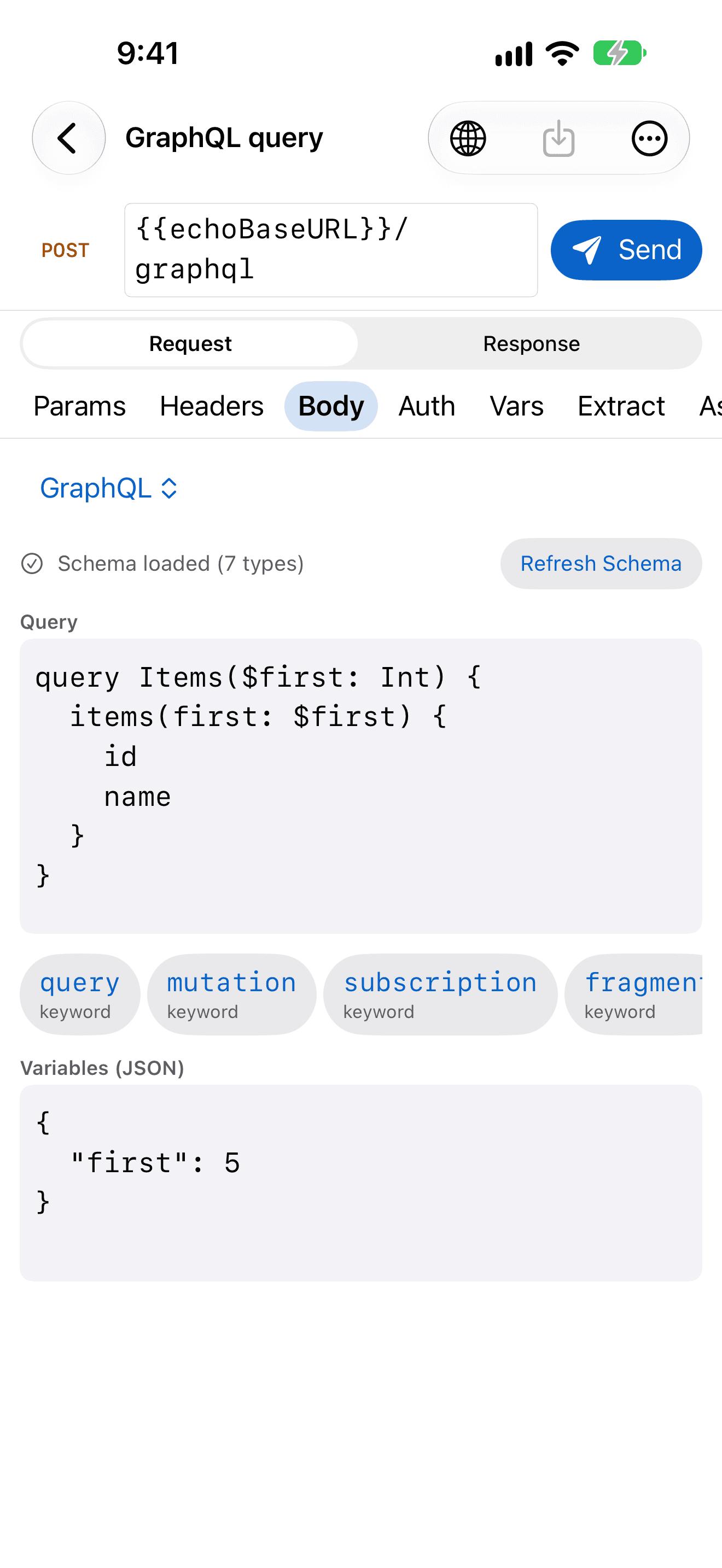
RequestPad fetches the server's schema once and suggests as you type. Variables sit in JSON right under the query, and the answer lands in the same response viewer.

  • Schema introspection, cachedPRO
  • Suggestions as you typePRO
  • Same JSON tree, filter and timings
RequestPad on iPhone: a GraphQL query with variables, the schema loaded with 7 types and keyword suggestions below the editor.

05 · Run

Run the whole collection. See what passes.

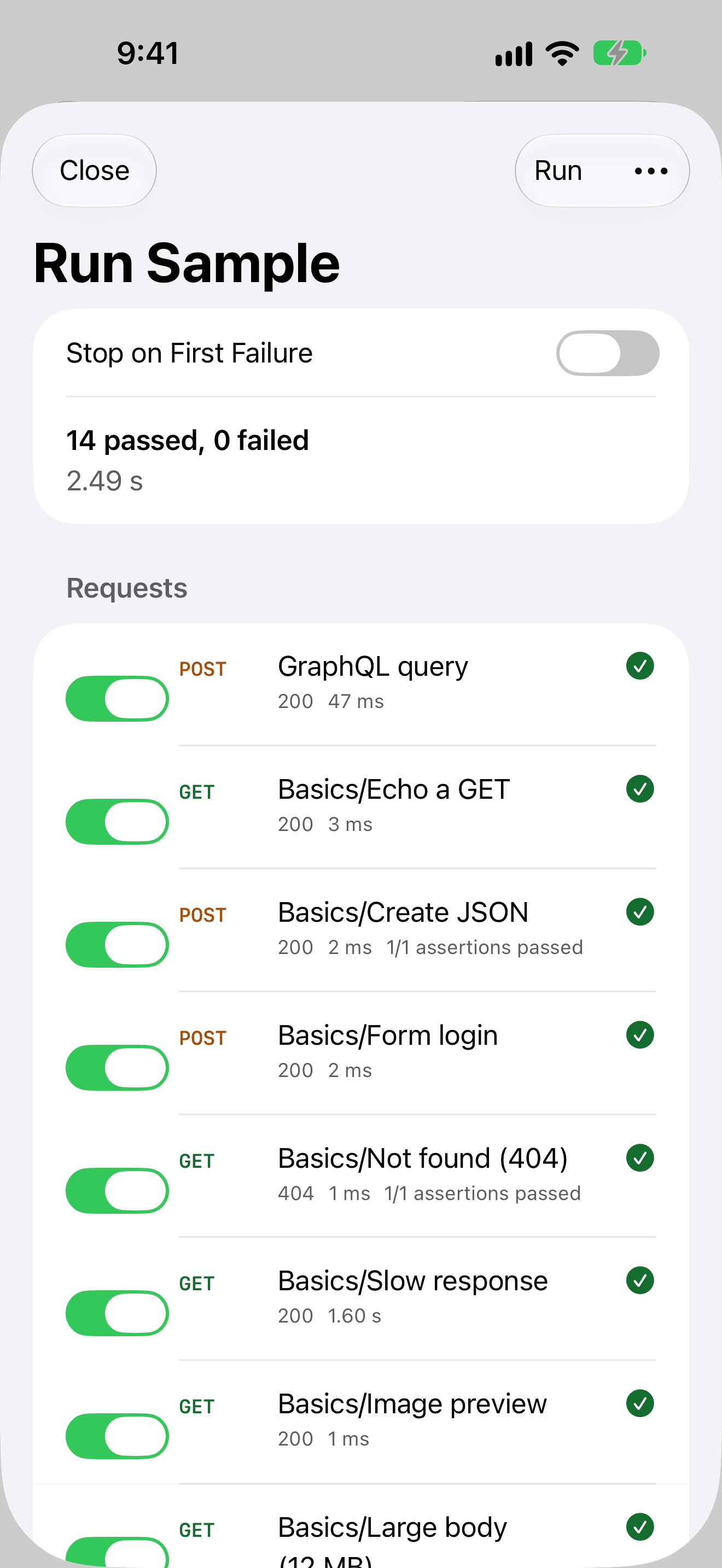
The runner sends every request in order and checks its assertions: 14 passed, 0 failed. Stop on the first failure, or export the whole run as JSON.

  • Assertions on status, headers, time and bodyPRO
  • Stop on first failurePRO
  • Results exported as JSONPRO
RequestPad on iPhone: the collection runner showing 14 passed and 0 failed, with each request's status code, time and assertions.

Git-friendly collections

Your API collection is just a folder of text files.

RequestPad reads and writes the plain-text .bru format, one file per request. Diff it, review it and commit it next to the code it calls.

  • A folder you ownPRO

    Keep collections in iCloud Drive, any Files location or a git repository.

  • Changes on disk, picked upPRO

    Edit a file elsewhere and RequestPad reloads it; your edits never silently overwrite it.

  • Bring what you havePRO

    Import OpenAPI 3 (JSON or YAML) and Postman v2.1 collections.

  • cURL in and out

    Paste a cURL command to make a request, or copy any request as cURL with secrets masked.

Basics/Create JSON.bru
meta {  name: Create JSON  type: http  seq: 2}post {  url: {{echoBaseURL}}/users  body: json}body:json {  {    "name": "{{userName}}",    "roles": ["admin", "dev"]  }}assert {  res.status: eq 200}

One purchase, three devices

At home on each device, not stretched to fit.

RequestPad is built with SwiftUI for iPhone, iPad and Mac, and follows the conventions of each. Pick a device and a screen: these are the App Store screenshots, straight from the app.

RequestPad on Mac: a POST request to {{echoBaseURL}}/users returning 200 OK with 626 bytes, the JSON response shown as a collapsible tree.
Send and read on Mac. 200 OK in milliseconds, with the JSON body as a tree you can filter with JSONPath.

Private by design

Your APIs and credentials stay yours.

An API client sees your tokens, your endpoints and your data. RequestPad keeps all of it on your devices.

  • No account, no cloud

    There is nothing to sign up for. Everything you create stays on your device, or in the folders you choose.

  • Secrets stay in your Keychain

    Secret variables, tokens and passwords live in the device Keychain. They are never written to .bru files, exports or history.

  • Requests go only where you send them

    No analytics, no tracking and no third-party SDKs. RequestPad connects only to the servers you enter, when you tap Send.

  • Try it without a server

    Local Echo is a small test server that runs inside the app on 127.0.0.1. Load the sample requests and explore every feature offline.

Free and Pro

Free to use. Pro when you need more.

One purchase unlocks Pro on iPhone, iPad and Mac with the same Apple Account.

Free

Everything you need to build, send and read requests.

  • 1 collection with up to 30 requests, plus the sample
  • Every HTTP method, with JSON, form and multipart bodies
  • Response viewer with JSON tree, JSONPath filter and timings
  • Environments, variables and Keychain secrets
  • Bearer, Basic and API key authorization
  • History of your last 100 requests
  • cURL import and export

RequestPad Pro

From $2.99 per month, or $39.99 once. Everything in Free, plus:

  • Unlimited collections and requests
  • Git-friendly .bru folder collections
  • OpenAPI 3 and Postman v2.1 import
  • GraphQL with schema autocomplete
  • OAuth 2.0 client credentials and PKCE
  • Extraction rules that feed the next request
  • Assertions and the collection runner
  • Persistent cookie jar
  • History of your last 1,000 requests
  • “Send Request” in Shortcuts
  • Quick Send from the Mac menu bar
Compare plans and pricing

US prices. The App Store shows the price in your currency before you buy.

Hit your APIs from anywhere.

Load the sample requests and send one to Local Echo. No server, no account, no setup.

Coming soon to the App Store

Requires iOS 17, iPadOS 17 and macOS 14 or later.